
The Key Holder’s Pattern: What a Wallet App for Crypto Really Holds
There’s a moment when you realise a wallet app for crypto is not a leather wallet at all. It does not store coins; it stores keys. The private keys that prove ownership of coins on the blockchain. The coins themselves remain on the network, distributed across nodes. When I first internalised this, it clicked: the app is a key holder, not a safe for money. The curse begins when you confuse the two. Lose the key and you lose access. No key, no coins. That is the hard truth I share with friends who are new.
All cryptocurrency wallets follow this pattern. They hand you a public address to receive funds and a private key to send them. Some apps reveal a seed phrase, a list of words that backs up the key. Others use newer methods like multi-party compute. The main job is to manage those keys safely. I like to think of it as a password manager for your money, but with no reset button. Seneca might say fortune builds slowly, but a lost key brings ruin quickly.
Wallets store private keys, not the crypto itself.
When you sign up for a service, you may be handed a free crypto wallet address to start. That address is safe to share, like an email for coins. But the private key must stay secret. I keep reminding myself: the address is public, the key is private. Simple as that. The app may display a balance, but the coins live on the chain, not in the app folder. It is hard to read the label from inside the jar, but the jar here is your own assumption that the app holds the money.
The Custody Divide: Custodial vs Self-Custody Wallets
There are two big camps. Custodial wallets are run by exchanges or other firms. They hold your keys for you. Convenience, but reliance on a third party. If they mess up, your funds are at risk. Self-custody wallets hand you the keys. You are the boss. No one else can move your coins. This is also called noncustodial or self-managed. The paradox of success: the easier the path, the more brittle the dependency.
Quick look at the two types
- Custodial: a company holds the keys, easy for new users but a single point of failure
- Self-custody: you hold the keys, full control, and full responsibility
- Custodial risk: the firm could fail or be hacked, taking your access with it
- Self-custody risk: you can lose the keys forever, no reset button
I lean toward self-custody for the long hold. But I get why people use custodial for quick trades. The source notes Tangem only makes hardware and noncustodial software. They do not custody funds, not regulated as a money firm. That is a clear stance. P100 is a self-custody wallet using MPC tech. Kraken Wallet is open source and self-custody too. Both show the trend of giving users the keys. As Andy Grove might say, snow melts from the edges; the shift to self-custody starts at the periphery.
Wallet Apps by Form Factor: From Web to Hardware
Wallets come in many shapes. Web wallets run in a browser. Desktop wallets install on a PC. Mobile wallets sit on your phone. Paper wallets are printed keys. Hardware wallets are small offline devices. Each carries trade-offs in ease and safety. I will walk through them so you can pick what fits your life. The storage of funds within a centralized exchange is not always secure, so don’t park all coins there. A peak always conceals a treacherous valley.
Common wallet forms
- Web wallets: least secure after exchanges, keys parked on servers
- Desktop full nodes: full blockchain, heavy, not for the average user
- Mobile wallets: good for daily use, but need rigorous backups
- Paper wallets: good for long hold, yet easy to lose or destroy
- Hardware wallets: safest, but less handy for daily spend
A hot wallet crypto is any wallet connected to the net, like mobile or web. Handy but exposed. A cold wallet is off the net. For large amounts, cold is king. But you still need to act with care. The source says the web client is the least secure choice after exchanges. Examples of web wallets are BitGo, Green Address, Circle, Blockchain. They store your private key for you on their servers. Profitability can become a leading indicator of decline when it is driven by retreat rather than reinvention; here, convenience can mask vulnerability.
Mobile and Desktop Wallet Apps: The Daily Driver
Mobile wallets like Mycelium or Coinomi run on phones. They are light, they don’t download the full chain. They refer to full nodes to check transactions. You can pay on the go. If your phone breaks, you can restore from a 12 or 24 word phrase. That is why backup is key. I always write the phrase on paper, not on my phone. Use a PIN and download from original stores to avoid scams. The signal is often already in the manual; the safeguard is in the habit.
Mobile wallets are portable and best for daily transactions.
Desktop full nodes like Bitcoin Core keep the whole chain on your drive. That takes days to download and lots of space. Not great for most folks. But it gives full control if you encrypt and backup. Web wallets such as Green Address or Circle store keys for you. Easy, but you trust a company. I would not keep life savings there. Desktop nodes help the network, but the attack surface from the internet exists. The safest road to Hell is the gradual one; complacency creeps.
If you use an Apple phone, note that a best crypto wallet app for iphone still runs as a hot wallet. iOS lacks secure element support for some curves, so keys sign in app memory. That is a fact from Kraken’s write-up. It does not mean iPhone is bad, just know the limit. The app sandbox keeps things apart, but the key touches memory. A tech person told me this is normal for mobile crypto apps. The label from inside the jar is hard to read, but the constraint is real.
Paper and Hardware: The Cold Storage Refuge
Paper wallets are just paper with keys, mostly for Bitcoin. They dodge online attacks. But paper burns, gets lost, or ripped. If you spend part, you must handle change right or lose the rest. Hardware wallets like Trezor or Ledger are small USB-like devices. They sign offline. Very safe. But less quick for coffee buys. They make you confirm on device with PIN. The future is often born in the manger as a symbol for the low-end, overlooked place; here, cold storage is the overlooked safeguard.
Cold storage pros and cons
- Paper: free, offline, but fragile as a memory
- Hardware: strong security, must buy from the real store
- Both need backup plans, or the castle falls
- Both keep keys off the net, away from the rhino
For an easy to use crypto wallet that is still safe, some pick hardware plus a phone app. That mix works. But beware fake devices. Buy from the maker’s site. Scams are real. I never buy from random sellers. Paper wallets need safe storage and you must specify change address when spending part. If not, remaining balance can vanish. The F.O.T.O. dilemma applies: we fear throwing out the old, but here we fear losing the key.
Smart Wallets and Social Recovery: The Guardian Pattern
New types called smart wallets add features. Loopring Smart Wallet is one. It uses social recovery. You pick guardians (friends, family, devices). If you lose phone, they help recover. No seed phrase to lose. That removes a single point of failure. Vitalik Buterin, Ethereum founder, pushed for this kind of wallet starting in early 2021 over less secure types. The jigsaw of security gets bigger; no single person holds enough pieces alone.

The best software wallet for crypto for some is one with account abstraction. Loopring lets you pay fees with any token, set daily limits, whitelist addresses, lock wallet, and use 2FA. It feels like a bank app but you hold keys. That is a big step for ease. The source says it is similar to a Web 2 banking-app-like experience. The puzzle outgrows the table; we need a bigger surface to hold the pieces.
Smart wallet features
- Social guardians for recovery, a distributed safety net
- No seed phrase single point of failure
- Daily transfer limits and whitelists to throttle ruin
- 2FA and cloud backup options, with new trade-offs
Loopring Smart Wallet Details
Loopring uses at least 3 guardians, odd number. They should not know each other to avoid collusion. You must teach them to ask a security question before approving. Test them yearly. If you do risky trades, pick guardians who reply fast. For calm holders, this matters less. I like the idea of not relying on one paper slip. The private key stays encrypted on device, never given out. The courage to prevent is quieter than the courage to repair.
Social recovery eliminates the seed phrase single point of failure.
Cloud recovery stores encrypted key in iCloud or Google. Free, but new risk if someone gets your cloud pass. Future plans split backup across sources. Two-factor uses authenticator app, not SMS. Whitelisted addresses let unlimited sends; new ones need extra checks. Daily limit caps transfers unless extra approval. Extra features include NFTs, staking, and fiat on-ramps. Upcoming: multi-network, inheritance, super guardian, browser extension. The Innovator’s Dilemma plays out: ceding some control to convenience may invite disruption from below.
Kraken Wallet Security Architecture
Kraken Wallet is a mobile, open source app under MIT license. It aims for transparency. On iOS, Apple’s CryptoKit lacks secp256k1 support, so no secure element for key store. Thus mobile crypto wallets are hot wallets, signing in software. Private keys sit in app memory sandboxed. That is the trade-off for being on a phone. The architecture supports many blockchains and high entropy key generation. The label from inside the jar: the phone is convenient, but the key is exposed.
Kraken key handling
- Keys generated with high entropy CSPRNG, a strong start
- Seed and mnemonic stored in Keychain or Keystore
- App lock uses biometric or passcode, a simple gate
- Password uses Argon2 KDF, not stored, as it should be
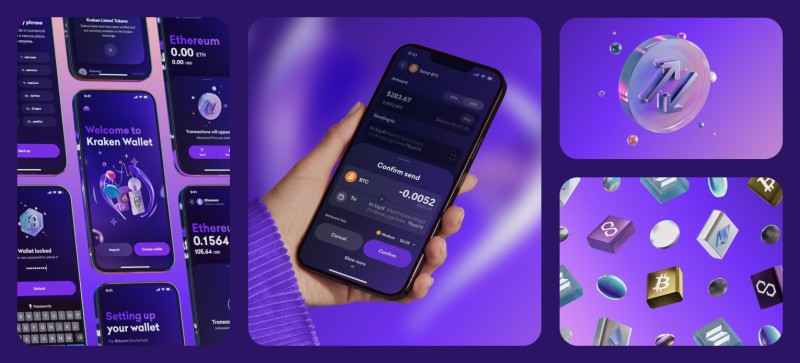
To find a secure wallet for crypto , check if it has external audit. Kraken had Trail of Bits audit, public. It uses Blowfish API to simulate tx risk. It proxies network to hide IP. No third-party analytics. That is a good sign for privacy. I trust open code more than closed. Encryption uses Argon2id, AES-GCM, random IV. Database encrypted, lockout after wrong password. Assumptions: device not rooted, OS sandbox strong. The signal is often already in the manual; the safeguard is in the habit.
How Coinspect Ranks Wallet Security
Coinspect made a ranking method for software wallets. They test with black-box interactive dApp and wizard. They weight checks by impact. The score reflects how hard it is to phish users. It is not absolute, but shows vendor commitment. They tested many wallets, later editions grew in count. The method uses analytic hierarchy process to weight checks. A failed rally is not about missing a marginal gain, but a tripwire; here, a low score signals danger.
Coinspect approach
- Gray-box pentest for single audits, a focused lens
- Black-box scaling with custom dApp
- Phishing resistance as proxy for security, the human factor
- Public ranking to compare wallets, camaraderie of transparency
You might see top 10 wallet crypto lists online. Those can be ads. A ranked security score from neutral testing is better ground. But don’t game the system; some devs try to trick checklists. Real security is deep, not just passing a test. Attack surface grew from simple Bitcoin wallets to multi-sig, mobile, web, browser extension with new vectors like RCE via JS injection. DApps are attack vector via wallet API. The Santa Rally of perfect scores can camouflage rot.
P100 and the Wallet-as-a-Bank Model
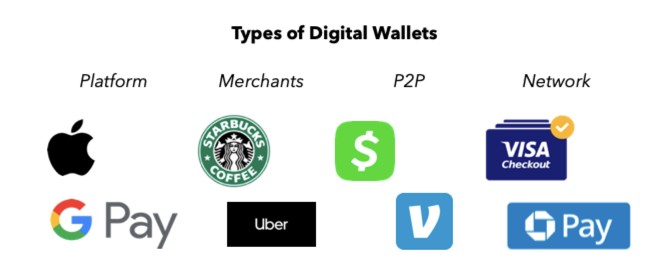
P100 is a self-custody app with MPC tech. It also gives Euro account, card, and p2p free transfers inside ecosystem. It shows how a wallet app for crypto blends with normal banking. Square Cash App and Coinbase do similar. They become wallet-as-a-bank: direct deposit, buy stocks, earn yield. AliPay began as escrow, now wealth management with hundreds of millions of users. The boundaries between fields loosen; the puzzle outgrows the table.
Wallet-as-a-bank examples
- P100: Euro account, card, crypto swap, MPC, a hybrid
- Square Cash App: bitcoin, stocks, deposit, a blended life
- Coinbase wallet: dollars, USDC interest, a foothold
- AliPay: grew from escrow to full finance, the manger to king
The most reliable crypto app in this model is one that keeps your keys and gives clear tools. P100 says it uses encryption and protocols. For newbies, a crypto apps for under 18 may be limited by law; check age rules before signup. I note that many such apps need ID for bank link. Study says 3 of 4 Americans use digital wallets, driven by unbanked access and convenience. Snow melts from the edges; adoption starts with those underserved.
General Tips for Picking a Wallet App for Crypto
Pick an exchange or app with good name, fair fees, and the coins you want. Enable 2FA always. For big holdings, hardware wallet is essential. Use strong password and hide backup phrase. Mobile apps need PIN and official store download. Paper needs safe spot. Web is least safe. The source says encryption standard must be used always. The traits that make a wallet convenient can later make it brittle.
My short checklist
- Reputation and supported coins, the baseline
- Two-factor authentication on, always
- Hardware for significant amounts, cold is king
- Backup phrase kept offline, never in the cloud alone
Kraken says download only from official site to avoid phish. Loopring says set 3+ guardians, odd, unknown to each other, test yearly, use limits. Both views on safety differ: one says hardware safest, other says smart wallet beats hardware due to supply chain risk. I keep both ideas; use what fits you. A best software wallet for crypto depends on your need for control vs ease. The dialectic of security: no single answer, only situational clarity.
Stats on Crypto Wallet Use
Many people use these tools. Over 75 million Bitcoin wallets exist per Statista, up from 53 million a year prior. Coinbase said 56 million verified users in early 2021. About 46 million Americans hold Bitcoin, some 17% of adults. Market cap huge, total crypto cap over two trillion. But poor key management loses billions. That hurts real people. A peak always conceals a treacherous valley.
Poor user management leads to loss of private keys and billions in losses.
Study says 3 of 4 Americans use digital wallets. Unbanked folks gain access. Convenience drives it. But a wallet app for crypto needs discipline more than tech. I repeat: the hardest part is not the app, it’s your habit of safe backup. The source notes the signal is often already in the manual; the safeguard is in the habit. The safest road to Hell is the gradual one; complacency with keys is that slope.
My Take on Keeping Keys Safe
I care about this topic because losing keys is final. No support call gets them back. So I write phrases on steel, not paper sometimes. I use a secure wallet for crypto that fits my day. For new users, an easy to use crypto wallet with clean backup is fine to learn. Then move to cold for savings. The hot wallet crypto is for spend, not for vault. The discipline is the real work.
Hey, don’t skip this part: test your backup. Send small amount, wipe app, restore. If that works, you are set. The signal is in the manual; the safeguard is in the habit. That line from the source sticks with me. A wallet app for crypto is a tool, you are the guard. I hope my notes help you start without the hassle. The discipline is the real work. It is hard to read the label from inside the jar, but the jar is your own behaviour.
Comments on “Wallet App for Crypto: How to Choose and Use It Without the Blind Spot”
No comments yet. Be the first to share your thoughts.